Installation
Linux
CUDA Installation
CUDA is a parallel computing platform and programming model created by NVIDIA that allows developers to use NVIDIA GPUs for high-performance parallel computing.
First, check if your GPU supports CUDA at https://developer.nvidia.com/cuda-gpus
Ensure your current Linux version supports CUDA. Enter
uname -m && cat /etc/*releasein the command line, you should see similar output
x86_64
DISTRIB_ID=Ubuntu
DISTRIB_RELEASE=22.04
Check if
gccis installed. Entergcc --versionin the command line, you should see similar output
gcc (Ubuntu 11.4.0-1ubuntu1~22.04) 11.4.0
Download the required CUDA from the following link(https://developer.nvidia.com/cuda-gpus), version 12.2 is recommended,please select the correct version according to the above output.

If you have previously installed CUDA (e.g., version 12.1), you need to uninstall it first using sudo /usr/local/cuda-12.1/bin/cuda-uninstaller. If this command cannot run, you can directly:
sudo rm -r /usr/local/cuda-12.1/
sudo apt clean && sudo apt autoclean
After uninstalling, run the following command and continue installation according to the prompts:
wget https://developer.download.nvidia.com/compute/cuda/12.2.0/local_installers/cuda_12.2.0_535.54.03_linux.run
sudo sh cuda_12.2.0_535.54.03_linux.run
Note: It is recommended to cancel the Driver installation before confirming whether the CUDA built-in driver version is compatible with the GPU.

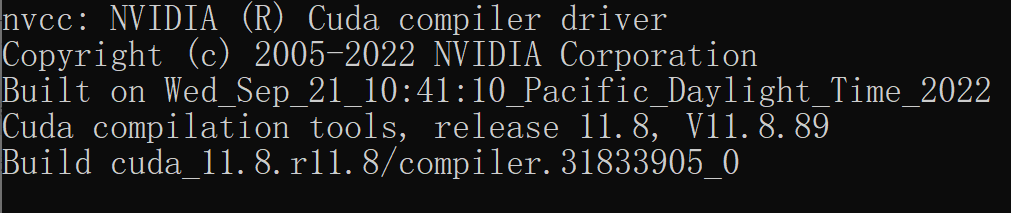
After completion, enter nvcc -V to check if the corresponding version number appears. If it appears, the installation is complete.
Windows
CUDA Installation
Open Settings, find Windows Specifications in About and ensure the system version is in the following list:
Supported Versions |
|---|
Microsoft Windows 11 21H2 |
Microsoft Windows 11 22H2-SV2 |
Microsoft Windows 11 23H2 |
Microsoft Windows 10 21H2 |
Microsoft Windows 10 22H2 |
Microsoft Windows Server 2022 |
Select the corresponding version to download and install according to the prompts.

Open cmd and enter
nvcc -V. If similar content appears, the installation is successful.
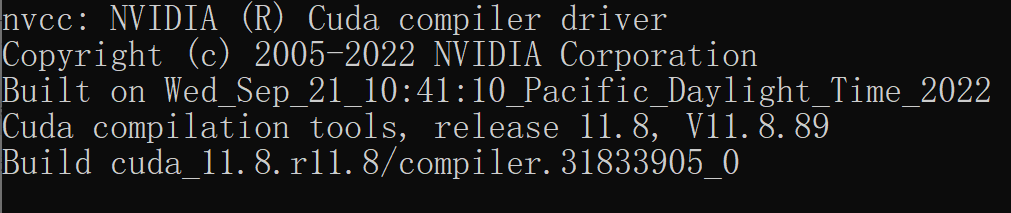
Otherwise, check the system environment variables to ensure CUDA is correctly imported.

LLaMA-Factory Installation
Before installing LLaMA-Factory, please make sure you have installed the following dependencies:
Run the following commands to install LLaMA-Factory and its dependencies:
git clone --depth 1 https://github.com/hiyouga/LLaMA-Factory.git
cd LLaMA-Factory
pip install -e .
pip install -r requirements/metrics.txt
If there are environment conflicts, try to resolve them using pip install --no-deps -e .
LLaMA-Factory Verification
After installation, you can quickly verify if the installation was successful by using llamafactory-cli version
If you can successfully see an interface similar to the one below, it means the installation was successful.

LLaMA-Factory Advanced Options
Windows
QLoRA
If you want to enable Quantized LoRA (QLoRA) on Windows, please select the appropriate bitsandbytes release according to your CUDA version.
pip install https://github.com/jllllll/bitsandbytes-windows-webui/releases/download/wheels/bitsandbytes-0.41.2.post2-py3-none-win_amd64.whl
FlashAttention-2
If you want to enable FlashAttention-2 on Windows platform, please select the appropriate flash-attention release according to your CUDA version.
Extra Dependency
If you have additional requirements, please install the corresponding dependencies.
Name |
Description |
|---|---|
torch |
Open-source deep learning framework PyTorch, widely used in machine learning and AI research. |
torch-npu |
PyTorch compatibility package for Ascend devices. |
metrics |
For evaluating and monitoring machine learning model performance. |
deepspeed |
Provides Zero Redundancy Optimizer required for distributed training. |
bitsandbytes |
For large language model quantization. |
hqq |
For large language model quantization. |
eetq |
For large language model quantization. |
gptq |
For loading GPTQ quantized models. |
awq |
For loading AWQ quantized models. |
aqlm |
For loading AQLM quantized models. |
vllm |
Provides high-speed concurrent model inference service. |
galore |
Provides efficient full-parameter fine-tuning algorithms. |
badam |
Provides efficient full-parameter fine-tuning algorithms. |
qwen |
Provides packages required for loading Qwen v1 models. |
modelscope |
ModelScope community, provides download channels for pre-trained models and datasets. |
swanlab |
Open-source training tracking tool SwanLab, for recording and visualizing the training process |
dev |
For LLaMA Factory development and maintenance. |